
 基于xml配置的AOP
# 1、xml方式AOP快速入门
前面我们自己编写的AOP基础代码还是存在一些问题的,主要如下:
被增强的包名在代码写死了
通知对象的方法在代码中写死了
if ("com.itheima.service.impl".equals(packageName)) {
    // 对 Bean 进行动态代理,返回的是 Proxy 代理对象
    Object proxyBean = Proxy.newProxyInstance(
        bean.getClass().getClassLoader(),
        bean.getClass().getInterfaces(),
        (Object proxy, Method method, Object[] args) -> {
            myAdvice.beforeAdvice();               // 执行 Advice 的 before 方法
            Object result = method.invoke(bean, args); // 执行目标方法
            myAdvice.afterAdvice();                // 执行 Advice 的 after 方法
            return result;
        }
    );
    // 返回代理对象
    return proxyBean;
}
return bean;
通过配置文件的方式去解决上述问题
配置哪些包、哪些类、哪些方法需要被增强
配置目标方法要被哪些通知方法所增强,在目标方法执行之前还是之后执行增强
配置方式的设计、配置文件(注解)的解析工作,Spring已经帮我们封装好了
xml方式配置AOP的步骤:
1、导入AOP相关坐标;
2、准备目标类、准备增强类,并配置给Spring管理;
3、配置切点表达式(哪些方法被增强);
4、配置织入(切点被哪些通知方法增强,是前置增强还是后置增强)。
# 1.1、导入AOP相关坐标
<dependency>
	<groupId>org.aspectj</groupId>
	<artifactId>aspectjweaver</artifactId>
	<version>1.9.6</version>
</dependency>
Spring-context坐标下已经包含spring-aop的包了,所以就不用额外导入了

# 1.2、准备目标类、准备增强类,并配置给Spring管理
// 接口定义
public interface UserService {
    void show1();
    void show2();
}

// 接口实现类
public class UserServiceImpl implements UserService {
    @Override
    public void show1() {
        System.out.println("show1...");
    }

    @Override
    public void show2() {
        System.out.println("show2...");
    }
}

// 通知类(Advice)
public class MyAdvice {
    public void beforeAdvice() {
        System.out.println("beforeAdvice");
    }

    public void afterAdvice() {
        System.out.println("afterAdvice");
    }
}
<!--配置目标类,内部的方法是连接点-->
<bean id="userService" class="com.itheima.service.impl.UserServiceImpl"/>
<!--配置通知类,内部的方法是增强方法-->
<bean id=“myAdvice" class="com.itheima.advice.MyAdvice"/>
# 1.3、配置切点表达式
哪些方法被增强
# 1.4、配置织入
切点被哪些通知方法增强,是前置增强还是后置增强
<aop:config>
    <!-- 配置切点表达式,对哪些方法进行增强 -->
    <aop:pointcut
        id="myPointcut"
        expression="execution(void com.itheima.service.impl.UserServiceImpl.show1())"
    />

    <!-- 切面 = 切点 + 通知 -->
    <aop:aspect ref="myAdvice">
        <!-- 指定前置通知方法是 beforeAdvice -->
        <aop:before method="beforeAdvice" pointcut-ref="myPointcut" />

        <!-- 指定后置通知方法是 afterAdvice -->
        <aop:after-returning method="afterAdvice" pointcut-ref="myPointcut" />
    </aop:aspect>
</aop:config>
# 2、xml方式AOP配置详解
xml配置AOP的方式还是比较简单的,下面看一下AOP详细配置的细节:
切点表达式的配置方式
切点表达式的配置语法
通知的类型
AOP的配置的两种方式
切点表达式的配置方式有两种,直接将切点表达式配置在通知上,也可以将切点表达式抽取到外面,在通知上进行引用
<aop:config>
    <!-- 配置切点表达式,对哪些方法进行增强 -->
    <aop:pointcut
        id="myPointcut"
        expression="execution(void com.itheima.service.impl.UserServiceImpl.show1())"
    />

    <!-- 切面 = 切点 + 通知 -->
    <aop:aspect ref="myAdvice">
        <!-- 指定前置通知方法是 beforeAdvice -->
        <aop:before
            method="beforeAdvice"
            pointcut-ref="myPointcut"
        />

        <!-- 指定后置通知方法是 afterAdvice(此处直接写切点表达式) -->
        <aop:after-returning
            method="afterAdvice"
            pointcut="execution(void com.itheima.service.impl.UserServiceImpl.show1())"
        />
    </aop:aspect>
</aop:config>
切点表达式是配置要对哪些连接点(哪些类的哪些方法)进行通知的增强,语法如下:
execution([访问修饰符]返回值类型 包名.类名.方法名(参数))
其中,
访问修饰符可以省略不写;
返回值类型、某一级包名、类名、方法名 可以使用 * 表示任意;
包名与类名之间使用单点 . 表示该包下的类,使用双点 .. 表示该包及其子包下的类;
参数列表可以使用两个点 .. 表示任意参数。
切点表达式举几个例子方便理解
//表示访问修饰符为public、无返回值、在com.itheima.aop包下的TargetImpl类的无参方法show
execution(public void com.itheima.aop.TargetImpl.show())
//表述com.itheima.aop包下的TargetImpl类的任意方法
execution(* com.itheima.aop.TargetImpl.*(..))
//表示com.itheima.aop包下的任意类的任意方法
execution(* com.itheima.aop.*.*(..))
//表示com.itheima.aop包及其子包下的任意类的任意方法
execution(* com.itheima.aop..*.*(..))
//表示任意包中的任意类的任意方法
execution(* *..*.*(..))
# 2.1、五种类型通知
AspectJ的通知由以下五种类型
| 通知名称 | 配置方式 | 执行时机说明 |
|---|---|---|
| 前置通知 | <aop:before> | 在目标方法执行 之前 执行 |
| 后置通知 | <aop:after-returning> | 在目标方法执行 成功完成之后 执行,如果抛出异常则不会执行 |
| 环绕通知 | <aop:around> | 在目标方法 前后都可执行,如果目标方法抛出异常,环绕后的逻辑不会执行 |
| 异常通知 | <aop:after-throwing> | 在目标方法 抛出异常时 执行 |
| 最终通知 | <aop:after> | 无论目标方法是否异常,都会最终执行(类似 finally) |
环绕通知
public void around(ProceedingJoinPoint joinPoint) throws Throwable {
	//环绕前
	System.out.println("环绕前通知");
	//目标方法
	joinPoint.proceed();
	///环绕后
	System.out.println("环绕后通知");
}
<aop:around method="around" pointcut-ref="myPointcut"/>
异常通知,当目标方法抛出异常时,异常通知方法执行,且后置通知和环绕后通知不在执行
public void afterThrowing(){
	System.out.println("目标方法抛出异常了,后置通知和环绕后通知不在执行");
}
<aop:after-throwing method="afterThrowing" pointcut-ref="myPointcut"/>
最终通知,类似异常捕获中的finally,不管目标方法有没有异常,最终都会执行的通知
public void after(){
	System.out.println("不管目标方法有无异常,我都会执行");
}
<aop:after method="after" pointcut-ref="myPointcut"/>
通知方法在被调用时,Spring可以为其传递一些必要的参数
| 参数类型 | 作用 |
|---|---|
JoinPoint | 连接点对象,任何通知都可使用,可以获得当前目标对象、目标方法参数等信息 |
ProceedingJoinPoint | JoinPoint 子类对象,主要是在环绕通知中执行 proceed(),进而执行目标方法 |
Throwable | 异常对象,使用在异常通知中,需要在配置文件中指出异常对象名称 |
JoinPoint 对象
public void 通知方法名称(JoinPoint joinPoint){
	//获得目标方法的参数
	System.out.println(joinPoint.getArgs());
	//获得目标对象
	System.out.println(joinPoint.getTarget());
	//获得精确的切点表达式信息
	System.out.println(joinPoint.getStaticPart());
}
ProceedingJoinPoint对象
public Object around(ProceedingJoinPoint joinPoint) throws Throwable {
    System.out.println(joinPoint.getArgs());         // 获得目标方法的参数数组
    System.out.println(joinPoint.getTarget());       // 获得目标对象
    System.out.println(joinPoint.getStaticPart());   // 获得切点方法的签名和位置等静态信息
    Object result = joinPoint.proceed();             // 执行目标方法
    return result;                                   // 返回目标方法返回值
}
Throwable对象
public void afterThrowing(JoinPoint joinPoint, Throwable th) {
    System.out.println("异常对象是:" + th + " 异常信息是:" + th.getMessage());
}
<aop:after-throwing method="afterThrowing" pointcut-ref="myPointcut" throwing="th"/>
# 2.2、Advice的子功能接口
AOP的另一种配置方式,该方式需要通知类实现Advice的子功能接口
public interface Advice {
}

例如:通知类实现了前置通知和后置通知接口
import org.springframework.aop.MethodBeforeAdvice;
import org.springframework.aop.AfterReturningAdvice;

import java.lang.reflect.Method;

public class Advices implements MethodBeforeAdvice, AfterReturningAdvice {

    // 前置通知:在目标方法调用前执行
    @Override
    public void before(Method method, Object[] args, Object target) throws Throwable {
        System.out.println("This is before Advice ...");
        // 你可以获取方法名、参数等:
        System.out.println("Method: " + method.getName());
        System.out.println("Args: " + java.util.Arrays.toString(args));
        System.out.println("Target object: " + target);
    }

    // 后置通知:在目标方法正常执行完毕后执行(没有抛出异常)
    @Override
    public void afterReturning(Object returnValue, Method method, Object[] args, Object target) throws Throwable {
        System.out.println("This is afterReturn Advice ...");
        // 同样也可以拿到方法、返回值等信息:
        System.out.println("Method: " + method.getName());
        System.out.println("Return value: " + returnValue);
    }
}
切面使用advisor标签配置
<aop:config>
<!-- 将通知和切点进行结合 -->
<aop:advisor advice-ref="advices" pointcut="execution(void com.itheima.aop.TargetImpl.show())"/>
</aop:config>
又例如:通知类实现了方法拦截器接口
public class MyMethodInterceptor implements MethodInterceptor {
    @Override
    public Object invoke(MethodInvocation methodInvocation) throws Throwable {
        System.out.println("前置逻辑功能...");

        // 执行目标方法
        Object result = methodInvocation.proceed();

        System.out.println("后置逻辑功能...");
        return result;
    }
}
切面使用advisor标签配置
<aop:config>
	<!-- 将通知和切点进行结合 -->
	<aop:advisor advice-ref=“myMethodInterceptor" pointcut="execution(void com.itheima.aop.TargetImpl.show())"/>
</aop:config>
# 2.3、使用aspect和advisor配置区别如下
1)配置语法不同:
<!-- 使用advisor配置 -->
<aop:config>
  <!-- advice-ref:通知Bean的id -->
  <aop:advisor advice-ref="advices"
               pointcut="execution(void com.itheima.aop.TargetImpl.show())"/>
</aop:config>
<!-- 使用aspect配置 -->
<aop:config>
  <!-- ref:通知Bean的id -->
  <aop:aspect ref="advices">
    <aop:before method="before"
                pointcut="execution(void com.itheima.aop.TargetImpl.show())"/>
  </aop:aspect>
</aop:config>
2)通知类的定义要求不同,advisor 需要的通知类需要实现Advice的子功能接口:
import org.springframework.aop.MethodBeforeAdvice;
import java.lang.reflect.Method;

public class Advices implements MethodBeforeAdvice {

    @Override
    public void before(Method method, Object[] args, Object target) throws Throwable {
        System.out.println("This is before Advice ...");
    }

    public void afterReturning(Object returnValue, Method method, Object[] args, Object target) throws Throwable {
        System.out.println("This is afterReturn Advice ...");
    }
}
aspect 不需要通知类实现任何接口,在配置的时候指定哪些方法属于哪种通知类型即可,更加灵活方便:
public class Advices {
	public void before() {
		System.out.println("This is before Advice ...");
	}

  public void afterReturning() {
		System.out.println("This is afterReturn Advice ...");
	}
}
3)可配置的切面数量不同:
一个advisor只能配置一个固定通知和一个切点表达式;
一个aspect可以配置多个通知和多个切点表达式任意组合,粒度更细。
4)使用场景不同:
如果通知类型多、允许随意搭配情况下可以使用aspect进行配置;
如果通知类型单一、且通知类中通知方法一次性都会使用到的情况下可以使用advisor进行配置;
在通知类型已经固定,不用人为指定通知类型时,可以使用advisor进行配置,例如后面要学习的Spring事务控制的配置;
由于实际开发中,自定义aop功能的配置大多使用aspect的配置方式,所以我们后面主要讲解aspect的配置,advisor是为了后面Spring声明式事务控制做铺垫,此处大家了解即可。
# 3、xml方式AOP原理剖析
通过xml方式配置AOP时,我们引入了AOP的命名空间,根据讲解的,要去找spring-aop包下的META-INF,在去找spring.handlers文件

http\://www.springframework.org/schema/aop=org.springframework.aop.config.AopNamespaceHandler
最终加载的是 AopNamespaceHandler,该Handler的init方法中注册了config标签对应的解析器
this.registerBeanDefinitionParser("config", new ConfigBeanDefinitionParser());
以ConfigBeanDefinitionParser作为入口进行源码剖析,最终会注册一个AspectJAwareAdvisorAutoProxyCreator进入到Spring容器中,那该类作用是什么呢?看一下集成体系图

AspectJAwareAdvisorAutoProxyCreator 的上上级父类AbstractAutoProxyCreator中的postProcessAfterInitialization方法
//参数bean:为目标对象
public Object postProcessAfterInitialization(@Nullable Object bean, String beanName) {
	if (bean != null) {
		Object cacheKey = this.getCacheKey(bean.getClass(), beanName);
		if (this.earlyProxyReferences.remove(cacheKey) != bean) {
			//如果需要被增强,则wrapIfNecessary方法最终返回的就是一个Proxy对象
			return this.wrapIfNecessary(bean, beanName, cacheKey);
		}
	}
	return bean;
}
通过断点方式观察,当bean是匹配切点表达式时,this.wrapIfNecessary(bean, beanName, cacheKey)返回的是一个JDKDynamicAopProxy

可以在深入一点,对wrapIfNecessary在剖析一下,看看是不是我们熟知的通过JDK的Proxy.newProxyInstance(ClassLoader loader, Class<?>[] interfaces,InvocationHandler h) 的方式创建的代理对象呢?经过如下一系列源码跟踪
==> this.wrapIfNecessary(bean, beanName, cacheKey)
==> Object proxy = this.createProxy(参数省略)
==> proxyFactory.getProxy(classLoader)
==> this.createAopProxy().getProxy(classLoader)
==> getProxy()是一个接口方法,实现类有两个,如下截图
==> Proxy.newProxyInstance(classLoader, this.proxiedInterfaces, this)
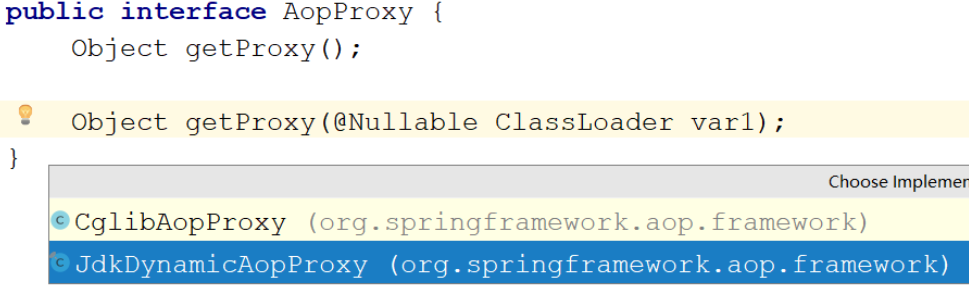

动态代理的实现的选择,在调用getProxy() 方法时,我们可选用的 AopProxy接口有两个实现类,如上图,这两种都是动态生成代理对象的方式,一种就是基于JDK的,一种是基于Cglib的
| 代理技术 | 使用条件 | 配置方式 |
|---|---|---|
| JDK 动态代理技术 | 目标类有接口,是基于接口动态生成实现类的代理对象 | 目标类有接口的情况下,默认方式 |
| Cglib 动态代理技术 | 目标类无接口且不能使用 final 修饰,是基于被代理对象动态生成子对象为代理对象 | 目标类无接口时,默认使用该方式;目标类有接口时,手动配置 <aop:config proxy-target-class="true"> 强制使用 Cglib 方式 |
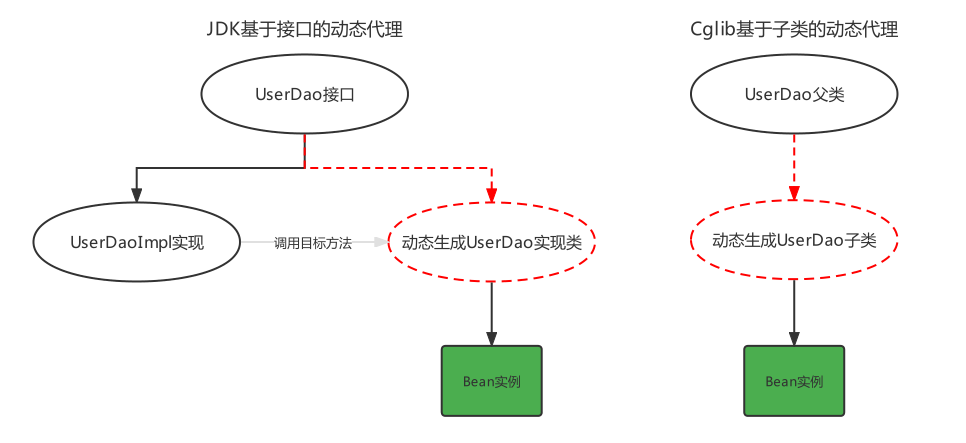
JDK的动态代理代码,之前已经写过了,下面看一下Cglib基于超类的动态代理
Target target = new Target();           // 目标对象
Advices advices = new Advices();       // 通知对象
Enhancer enhancer = new Enhancer();   // 增强器对象

enhancer.setSuperclass(Target.class); // 增强器设置父类

// 增强器设置回调
enhancer.setCallback((MethodInterceptor) (obj, method, args, methodProxy) -> {
    advices.before();
    Object result = method.invoke(target, args);
    advices.afterReturning();
    return result;
});

// 创建代理对象
Target targetProxy = (Target) enhancer.create();

// 测试
String result = targetProxy.show("haohao");